Traditional logo makers offer thousands of pre-designed 2D logo templates, and customizable editing tools to make your brand stand out. Now, AI technology brings logo creation to the next level. With AI-powered logo makers, you will no longer need advanced design technology to craft impressive 3D logos.
In this post, we will explore the best 3D logo makers, covering the features that make each tool unique. Let’s dive in and start creating a 3D logo that resonates with your audiences!
Table of Contents


Check for More 3D Video Logo Templates >
Best Video Ad Makers That Help You Donimate the Market >
Biggest Advantages of 3D Logo Over 2D Logo
A 3D logo has several advantages over a traditional 2D logo, adding a new level of engagement and realism to your brand’s identity. Here are more details.
A 3D logo creates a sense of depth and realism, making it more eye-catching and memorable than a flat 2D logo. This helps your brand stand out and convert, especially for social media platforms where attention is limited.
3D logos appear to be more dynamic and sophisticated, which adds professionalism as well as perceived value to your brand. They work well in businesses aiming for innovation and cutting-edge technologies.
A 3D logo can adapt well across different media formats, such as animations, videos, even augmented reality applications. This allows for interactive and immersive experiences.
1. FlexClip
Whether you like a still 3D logo image or animated 3D logo video, FlexClip gets you covered. With its intuitive and powerful AI text-to-image generator, you can transform a prompt into a professional-leve 3D logo image.
Apart from that, FlexClip provides over 500 3D logo video templates for you to customize. We are not talking about simple text modification, but uploading a still logo, and letting AI animte it like the template.


How to Create a 3D Logo with FlexClip
Access FlexClip’s AI Text-to-Image tool, enter a simple prompt that best describes the logo you need. As for the style, we suggest you go Photo, Cinematic, or Studio Shot. After that, set up the ratio and image count, hit Generate. You will soon be able to view the 3D logo AI generated.
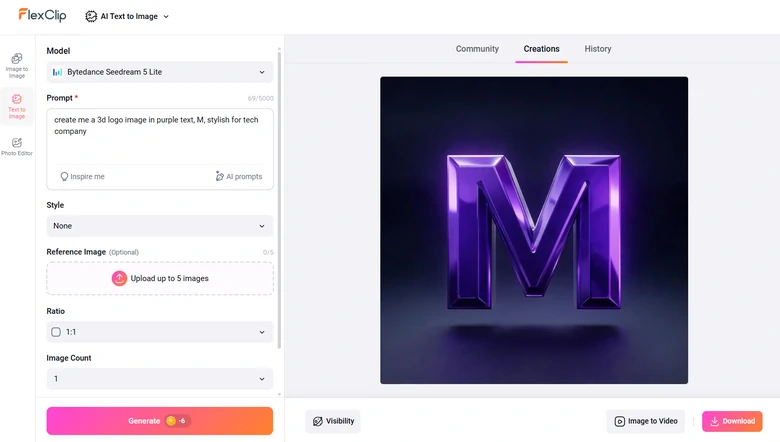
Generate 3D Logo Image Using FlexClip
Switch to FlexClip's template page, pick a template you like, and hit AI Recreate.
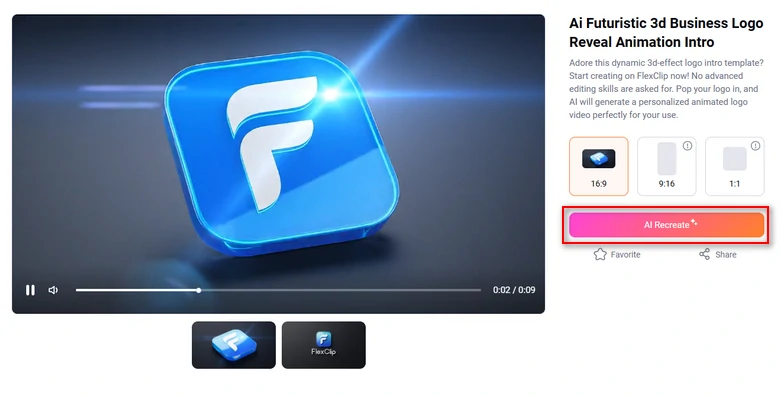
AI Recreate 3D Logo Template
Upload the AI-generated logo, and hit Generate. The generation should be done within several seconds.
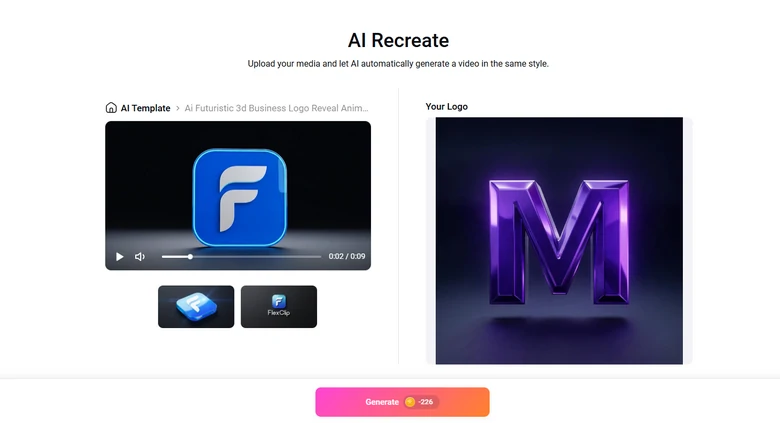
Upload 3D Logo Image and Start Generation
You will be lead to FlexClip's timeline. Now, you can make further edits like changing the background, modifying text, swapping in new background music. When the edits are done, export the video in resolution you like and share.
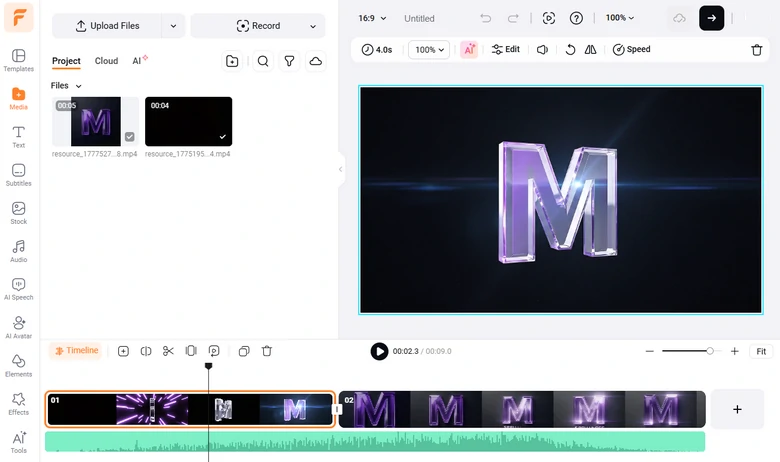
Edit 3D Logo Video
2. Canva
Canva creates stunning 3D logos in no time. Hundreds of 3D graphic logo templates are waiting for you to customize. Yet, you have options to create a 3D logo from scratch with rich 3D elements, and tools to change text font, size, color, or size. Boost your creativity with the power of an easy 3D logo maker!
Polish your 3D logo design with fun effects, filters, image enhancers to improve the overall quality of the 3D logo. You can also cut, crop, modify the dimensions, or remove the background of the 3D logo, based on how you want to use it.
How to Create a 3D Logo with Canva
Canva has a collection of professionally designed 3D logo templates. Find the one you need most by filtering the search results by style, theme, or color.

Pick a 3D Logo Template from Canva
Customize the 3D logo by swapping the colors, changing text, bringing in more shapes to create visual depth.

Edit Canva 3D Logo Template
Finalize the 3D logo design and download it in PNG format.
3. Renderforest
Renderforest makes 3D logo creation fun and easy. Different from Canva who provides graphic 3D logos, Renderforest has over 1000 animated 3D logo templates. Realistic business 3D logos, animated 3D logos, festive 3D logos for Halloween, Thanksgiving, or 3D logos with music visualizers. You can find literally all the 3D logo templates you need.
You can’t find any design tools in Renderforst, which means you can’t start from scratch. Yet, it is extremely simple to customize Renderforest’s 3D logos.
How to Customize Renderforest’s 3D Logos

Renderforest 3D Logo Template

Edit Renderforest 3D Logo Template
4. Simplified
Simplified is more known as an AI video maker. Powered by AI, it can also generate 3D logos based on your industry and brand name. The algorithm applied can understand your design choices and preferences, generate what you need with great ease.
After Simplified comes up with a great 3D logo, you can work together in real time, share ideas, and make revisions on the fly. You are also able to upload your current logo and make changes.
How Simplified Generates a 3D Logo
5. Gemoo
Gemoo creates 3D logos by animating your static logo. This sounds similar to What FlexClip can do. Yet, Gemoo only animates a still logo in one way, which is the circle motion. You can’t select the motion style, or adjust the duration.

Gemoo 3D Logo Maker Page
How to Turn a Still Logo into a 3D Logo
6. FlamingText
As its name suggests, FlamingText creates excellent 3D text logos. It has over 1000 built-in 3D text examples in different fonts, colors, and backgrounds. Whenever you enter a word, it will automatically generate 3D text which is perfect for a logo. Some 3D logo examples even contain simple animations.

Flaming Text 3D Logo Creator
How to Create a 3D Text Logo
FAQs About Arabic Video Editors
1. What file formats are best for 3D logos?
The most common file formats for 3D logo includes transparent PNG, SVG, OBJ or FBX. They serve different purposes. PNG always contains a transparent background, SVG is for scalability, and OBJ is for 3D modeling.
2. What colors work best for 3D logos?
Bright, gradient, and metallic colors often work well. The choice of colors should align with your brand identity and create a contrast to highlight the 3D effect.
3. Is a 3D logo compatible with printing?
Yes, 3D logo is compatible with printing. However, you need to ensure your 3D logo design is optimized for printing. Stick to SVG files or high-resolution SVG.




FlexClip AI Video Maker
Reach professional-quality videos faster with easy editing tools, templates, and smart AI.
Start Now for Free
Hot & Trending
-

Best Ways to Find Music in YouTube Videos
-
Instagram Story Video Quality Bad After Upload? Fix It!
-
How to Repost Video on TikTok & How to Remove TikTok Repost
-

Improve Video Quality Online: 3 AI Video Quality Enhancers You Can't Miss
-
4K Convert to HD 1080p without Watermark: Best 4k Video Converters
-

Best 8 Free Video Editors - No Download Required
-

Top 13 Birthday Video Makers with Music and Effects Free
-
How to Search Filters on TikTok & Use a Filter You See - TikTok Filter Guide